Try PacOS in action!
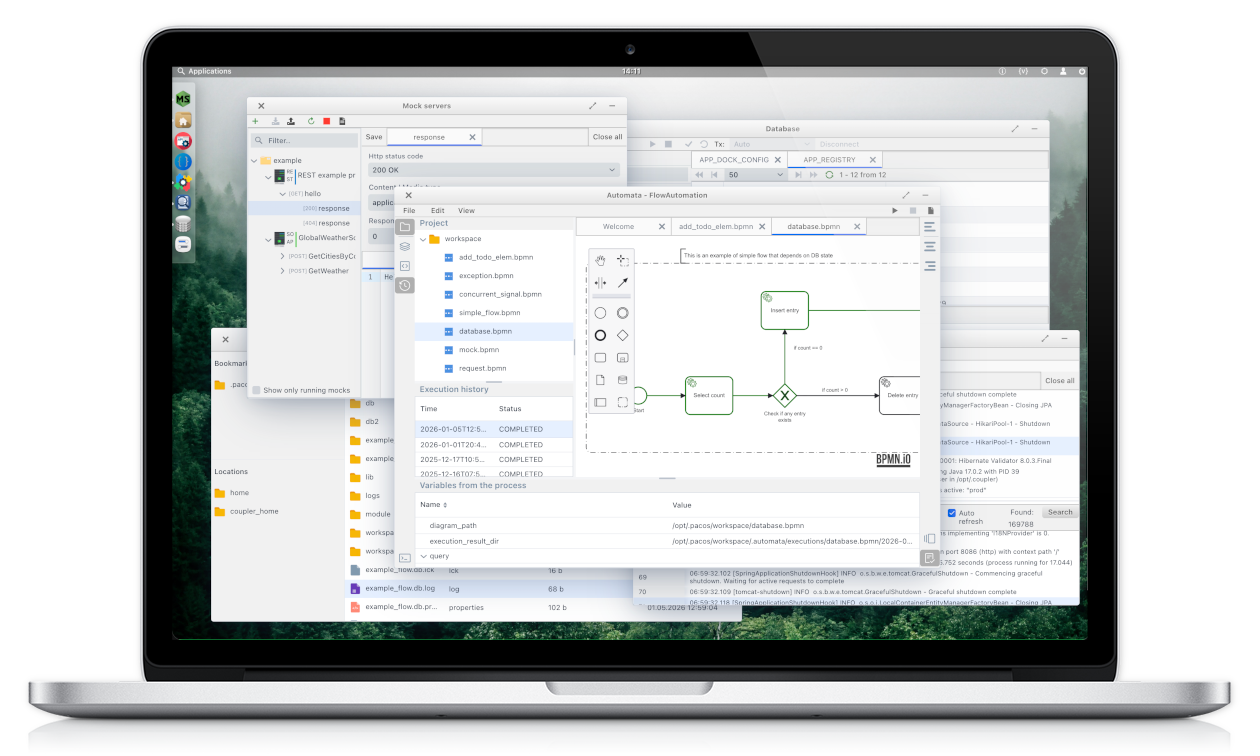
A unified, extensible environment for building, running and managing workflow-driven tools.
Install locally or in containers, extend with plugins, and orchestrate business processes using a clean, desktop-like Web-OS interface.
Install locally or in containers, extend with plugins, and orchestrate business processes using a clean, desktop-like Web-OS interface.
Web-OS for Your Business
PacOS brings together tools, processes, and automation inside a desktop-like environment designed for engineering teams..
Modularity
Install modules like apps. Extend PacOS with your own tools or integrate existing ones through a simple plugin model.
Interface
Work in windows, switch between modules, and manage multiple tasks at once — all inside a flexible, desktop-style UI..
How it Works
PacOS provides a modular, windowed Web-OS environment where each tool runs independently. Configure workflows, automation tasks, and plugins locally, then seamlessly transfer them to a server.
- Run locally or in shared server mode for team-wide collaboration.
- All automation workflows and plugin configurations can be transferred to a server effortlessly.
- Local work or automation created on one machine runs seamlessly on the server environment.
- Fully scalable — supports multiple users, permissions, and shared resources without conflicts.
Why PacOS?
A flexible platform built for teams who automate, integrate, and streamline work.- Modular Web-OS where tools run as independent windowed apps.
- Unified workspace instead of a scattered toolchain.
- Quickly automate workflows using the built-in BPMN editor and automation engine.
- Extend functionality with plugins or custom modules via Marketplace.
- Fully extensible: any Java developer can write their own extension based on the provided skeleton project and install it on-the-fly.
- Works locally or in shared server mode for team-wide collaboration.
- Free to use in both personal and business projects (with licensing restrictions).
Plugins
PacOS Web-OS offers a rich ecosystem of plugins that extend the platform in real time. Manage your files with the Explorer, monitor and search logs instantly with Glogg, test APIs with ApiNity, or create mock REST and SOAP servers with MockServer — all without leaving the workspace. Every plugin runs in an isolated context and is synchronized across all user sessions, allowing multiple users to collaborate seamlessly while configuring or interacting with the same modules. The dynamic variable system lets users adjust plugin behavior on the fly, so you can customize your workspace instantly without restarting or reloading configurations.
Run PacOS in seconds using container
docker run --name webos \
  -e JAVA_OPTS="-Djava.rmi.server.hostname=127.0.0.1" \
  --platform linux/amd64 \
  -p 8086:8086 \
  -ti pacosdev/webos:latest
Run PacOS in Standalone Mode (JAR)
java -jar pacos.jar -DworkingDir=/path/to/working/dir
Open & Free to Use
PacOS is free to use in both personal and commercial environments. The platform is transparent and publicly accessible — but cannot be resold or repackaged as a paid product.
- Free for personal and business use without usage limits.
- Source code is publicly available for inspection and learning.
- Not open-source for redistribution — selling or repackaging is prohibited.
- Ideal for organizations that want a transparent platform without vendor lock-in.
Extensible by Any Java Developer
PacOS can be expanded with custom modules built by any Java developer, allowing teams to add exactly the tools they need in their environment. Whether it’s Kafka utilities, AI-powered helpers, domain-specific business operations, or entirely new developer tools — PacOS adapts to your stack instead of the other way around. PacOS provides a ready-to-use skeleton project that is always compatible with the latest release. It includes examples for building modal windows, APIs, permissions, UI components, and background services — giving developers everything needed to create powerful extensions that install instantly and run like native modules.Skeleton project source code